
Backing up a box truck is one of the most stressful and risky tasks for drivers and fleet owners. Blind spots, tight loading docks, and busy urban areas make accidents far too common. Box Truck Backup Camera Installation is one of the most effective ways to improve safety, reduce damage costs, and boost driver confidence—without complex technology or excessive expense.
What Is Box Truck Backup Camera Installation?
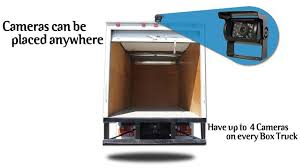
Box Truck Backup Camera Installation is the process of mounting a rear-facing camera on a box truck and connecting it to a monitor inside the cab. The system gives drivers a clear, real-time view of what’s behind the vehicle when reversing.
Read too: Franklin Truck Parts Near Me: Your Complete Guide to Local Truck Parts & Repair Solutions
Unlike passenger vehicles, box trucks often do not come factory-equipped with rear cameras, especially older models. This makes aftermarket installation a common and valuable upgrade.
Why Is a Backup Camera Important for Box Trucks?
Box trucks have significantly larger blind spots than standard vehicles.
Key Safety Reasons
- Drivers cannot see directly behind the cargo box
- Pedestrians and obstacles are easily hidden
- Loading docks require precise maneuvering
According to safety research, backing accidents account for a significant portion of low-speed commercial vehicle incidents, many of which are preventable with better visibility.
Installing a backup camera helps:
- Reduce collisions
- Lower insurance claims
- Protect pedestrians and property
- Improve driver confidence
Is a Backup Camera Required by Law for Box Trucks?
Currently in the US, backup cameras are mandatory for new passenger vehicles, but commercial box trucks are not universally required to have them.
However:
- Many companies require them internally
- Insurance providers often offer discounts
- OSHA and fleet safety programs strongly recommend them
In practice, backup cameras are becoming a best-practice standard for box truck operations.
What Types of Backup Cameras Are Best for Box Trucks?
Not all camera systems are the same. Choosing the right type is crucial.
Wired Backup Camera Systems
Best for: Long-term reliability and commercial use
Pros
- Stable signal
- No interference
- Excellent video quality
Cons
- More installation time
Wireless Backup Camera Systems
Best for: Faster installs and temporary setups
Pros
- Easier installation
- Less wiring
Cons
- Possible signal interference
- Not ideal for very long trucks
📌 For most box trucks (16–26 ft), wired systems are recommended due to reliability.
What Comes in a Box Truck Backup Camera Kit?
A standard commercial kit usually includes:
- Rear-view camera (weatherproof)
- Dashboard or windshield monitor (5–7 inches)
- Power and video cables
- Mounting hardware
- Installation manual
Optional upgrades may include:
- Night vision (infrared LEDs)
- Wide-angle lenses (120°–170°)
- Audio capability
Tools Needed for Box Truck Backup Camera Installation
Before starting, gather these basic tools:
- Drill with metal bits
- Screwdrivers (Phillips & flathead)
- Wire strippers and connectors
- Electrical tape or heat-shrink tubing
- Zip ties
- Multimeter (recommended)
⏱️ Average install time: 2–4 hours for beginners.
Step-by-Step Box Truck Backup Camera Installation
Step 1: Choose the Camera Mounting Location
The most common location is:
- Top center of the rear cargo door, just below the roofline
This provides the widest and clearest rear view.
📏 Tip: Mount the camera 8–10 inches below the roof edge to reduce glare and rain distortion.
Step 2: Drill and Secure the Camera
- Drill pilot holes carefully
- Use rust-resistant screws
- Seal holes with automotive silicone to prevent water leaks
⚠️ Avoid drilling into structural beams or wiring channels.
Step 3: Route the Camera Cable Inside the Box
- Run the cable along the interior roof edge
- Secure it every 12–18 inches with clips or zip ties
- Avoid sharp edges and moving parts
This protects the cable from vibration and cargo damage.
Step 4: Route the Cable to the Cab
Common cable paths include:
- Along the box-to-cab pass-through (if available)
- Under the truck chassis using protective conduit
📌 Use split loom tubing for under-vehicle routing to prevent abrasion.
Step 5: Install the Monitor in the Cab
Popular mounting options:
- Dashboard mount
- Windshield suction mount
- Overhead console mount
Ensure the monitor:
- Does not block the driver’s view
- Is visible without turning the head
Step 6: Power the System
Most systems connect to:
- Reverse light circuit (camera activates when reversing)
- Or accessory power (always on when ignition is on)
Example wiring detail:
- Voltage: 12–24V DC (most commercial cameras support both)
Use a multimeter to confirm power before connecting.
Step 7: Test and Adjust the Camera Angle
- Shift into reverse
- Check image clarity
- Adjust angle to see bumper edge and ground
The ideal view shows:
- Bottom 12–24 inches of the ground
- Entire width of the truck
Wired vs Wireless: Which Is Better for Box Trucks?
Comparison Table
| Feature | Wired Camera | Wireless Camera |
|---|---|---|
| Signal reliability | ✅ Excellent | ⚠️ Moderate |
| Installation time | ⚠️ Longer | ✅ Faster |
| Interference risk | ✅ None | ⚠️ Possible |
| Best for box trucks | ✅ Yes | ⚠️ Limited |
Conclusion: Wired systems are the industry standard for commercial box trucks.
How Much Does Box Truck Backup Camera Installation Cost?
Cost Breakdown (US Average)
| Item | Cost Range |
|---|---|
| Camera system | $150–$500 |
| Professional installation | $200–$600 |
| Total installed cost | $350–$1,000 |
📌 Many fleets recover this cost quickly through reduced accident repairs and insurance claims.
DIY vs Professional Installation: Which Should You Choose?
DIY Installation
Pros
- Lower cost
- Flexible timing
Cons
- Requires basic electrical skills
- Risk of improper wiring
Professional Installation
Pros
- Faster and cleaner
- Warranty protection
- Reliable wiring
Cons
- Higher upfront cost
👉 For fleets or daily-use trucks, professional installation is usually worth it.
Common Installation Mistakes to Avoid
- ❌ Mounting the camera too low
- ❌ Poor cable protection
- ❌ Using weak ground connections
- ❌ Blocking airflow or visibility with the monitor
Avoiding these mistakes ensures long-term reliability.
Maintenance Tips for Backup Cameras
Backup cameras are low-maintenance but not maintenance-free.
Simple Care Routine
- Clean lens weekly with microfiber cloth
- Check wiring every 6 months
- Inspect mounts after harsh weather
🧼 Use mild soap and water—avoid harsh chemicals.
Do Backup Cameras Work at Night and in Bad Weather?
Most commercial systems include:
- Infrared night vision
- Weatherproof housings (IP67 or IP68 rated)
While heavy rain or snow can reduce clarity, cameras still provide better visibility than mirrors alone.
Can Backup Cameras Be Combined With Other Safety Systems?
Yes. Many fleets pair backup cameras with:
- Audible reverse alarms
- Side-view cameras
- Dash cameras
- Proximity sensors
Layered safety systems significantly reduce accidents.
Understanding Backup Camera Technology (Basic Overview)
Backup cameras fall under the broader category of vehicle safety systems. For a general explanation of how rear-view camera systems work, you can refer to Wikipedia:
👉 https://en.wikipedia.org/wiki/Backup_camera
FAQ: Box Truck Backup Camera Installation
❓ How long does box truck backup camera installation take?
DIY installs take 2–4 hours. Professional installs usually take 1–2 hours.
❓ Do backup cameras drain the battery?
No. When wired correctly, they only draw power when the ignition or reverse gear is active.
❓ Can I install a backup camera on an older box truck?
Yes. Age does not matter as long as the truck has a 12V or 24V electrical system.
❓ Is one camera enough for a large box truck?
For basic reversing, yes. For full coverage, some fleets add side cameras.
❓ Will a backup camera help with insurance costs?
Often yes. Many insurers recognize backup cameras as a safety upgrade.
Conclusion
Box Truck Backup Camera Installation is one of the smartest safety upgrades you can make. It reduces blind spots, prevents costly accidents, protects drivers and pedestrians, and quickly pays for itself. Whether you install it yourself or hire a professional, the result is safer, more confident operation every time the truck goes into reverse.
🚚 If this guide helped you, share it with fleet managers, drivers, or business owners who operate box trucks and value safety.
Leave a Reply