
If you’re searching for Heavy Truck Collision Estimating Software, you’re likely running a body shop, fleet repair facility, or insurance operation dealing with commercial truck accidents. Estimating repairs on heavy-duty trucks is far more complex than passenger vehicles—and manual calculations can cost you time and profit.
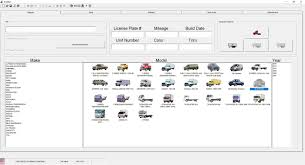
This guide explains what heavy truck estimating software does, how it works, pricing expectations, key features, and how to choose the best solution for your operation.
Read too: Top Trucking Companies That Still Have Manual Transmissions
What Is Heavy Truck Collision Estimating Software?
Heavy Truck Collision Estimating Software is a digital platform designed to calculate repair costs for damaged commercial trucks, including Class 6, 7, and 8 vehicles.
These systems help repair shops:
- Generate accurate parts pricing
- Calculate labor times
- Document structural damage
- Produce insurance-ready estimates
- Track supplements and revisions
Heavy trucks are built differently from passenger vehicles. They often include complex frame rails, air brake systems, and diesel powertrains. You can learn more about heavy truck classifications here:
https://en.wikipedia.org/wiki/Truck_classification
Because of their size and mechanical complexity, collision repair estimates require specialized tools.
Why Can’t You Use Standard Auto Estimating Software?
Many shop owners ask this question.
Standard automotive software focuses on:
- Passenger cars
- Light-duty trucks
- Factory repair procedures for consumer vehicles
Heavy-duty trucks require:
- Commercial labor rate structures
- Frame straightening specifications
- OEM and aftermarket part matching
- Cab and sleeper configurations
- Custom body equipment estimates
Using the wrong platform can result in:
- Underestimated labor hours
- Missing line items
- Delayed insurance approvals
- Lost revenue
How Does Heavy Truck Collision Estimating Software Work?
Step-by-Step Workflow
- Vehicle Identification
- Enter VIN or manual vehicle specs.
- Select truck class and configuration.
- Damage Input
- Identify affected systems.
- Upload photos for documentation.
- Parts Selection
- Choose OEM or aftermarket parts.
- Verify availability and pricing.
- Labor Calculation
- Software applies industry-standard labor times.
- Adjust rates as needed.
- Estimate Generation
- Create PDF report.
- Submit to insurer or fleet manager.
- Supplement Management
- Add additional damage discovered during teardown.
- Track approvals.
The entire process can reduce estimate preparation time by up to 40% compared to manual calculations.
What Features Should You Look For?
Not all heavy truck estimating platforms are equal.
Essential Features
- VIN decoding for commercial trucks
- Labor time database specific to heavy vehicles
- OEM parts integration
- Aftermarket parts pricing
- Photo documentation tools
- Insurance export compatibility
- Cloud-based access
Advanced Features
- Frame measurement integration
- 3D damage mapping
- Fleet management integration
- Real-time parts inventory updates
- Analytics and profitability tracking
How Much Does Heavy Truck Collision Estimating Software Cost?
Pricing depends on vendor, features, and shop size.
Typical Pricing Models
| Plan Type | Monthly Cost |
|---|---|
| Basic Plan | $200–$400 |
| Professional Plan | $500–$900 |
| Enterprise/Fleet | $1,000+ |
Some platforms charge per estimate. Others use subscription models.
Additional costs may include:
- Setup fees
- Training fees
- Add-on modules
- User licenses
Is It Worth the Investment?
Let’s break it down.
If your shop processes 30 heavy truck estimates per month and underestimates each by $500 due to manual errors, you could lose $15,000 monthly.
Even a $600 software subscription quickly pays for itself by:
- Reducing missed line items
- Speeding up approvals
- Improving estimate accuracy
- Minimizing disputes
Accuracy directly impacts profitability.
How to Choose the Right Software (Step-by-Step)
Step 1: Assess Your Shop Volume
- How many heavy truck repairs monthly?
- Average repair ticket size?
Step 2: Identify Your Primary Clients
- Insurance carriers?
- Fleet operators?
- Independent owner-operators?
Step 3: Request Demos
- Compare user interface.
- Evaluate speed and ease of use.
Step 4: Check Database Coverage
- Does it include major truck brands?
- Are labor times updated regularly?
Step 5: Evaluate Support and Training
- Is onboarding included?
- Are live training sessions available?
Testing at least 2–3 platforms before committing is recommended.
Case Study Example
A Midwest heavy truck repair facility transitioned from spreadsheet-based estimating to specialized software.
Results in 6 months:
- 25% faster estimate turnaround
- 18% increase in average repair invoice
- 30% reduction in insurance supplement delays
Digital documentation improved communication with insurers and fleet managers.
Benefits for Different Users
For Body Shops
- Improved profit margins
- Faster workflow
- Reduced manual errors
For Fleet Maintenance Facilities
- Standardized repair documentation
- Historical cost tracking
- Predictive maintenance analysis
For Insurance Adjusters
- Transparent cost breakdowns
- Faster claim processing
- Consistent estimate formats
Common Mistakes to Avoid
- Choosing software designed only for light-duty vehicles
- Ignoring training and onboarding
- Failing to update labor rates
- Not tracking estimate accuracy over time
- Overlooking integration capabilities
Software is only as effective as its implementation.
Cloud-Based vs On-Premise Software
Comparison
| Feature | Cloud-Based | On-Premise |
|---|---|---|
| Accessibility | Anywhere | Local network only |
| Updates | Automatic | Manual |
| Initial Cost | Lower | Higher |
| Maintenance | Vendor-managed | In-house |
Most modern platforms are cloud-based for flexibility and real-time updates.
Data Security Considerations
Because estimates involve financial and customer data, ensure the platform provides:
- Encrypted data storage
- Role-based access controls
- Secure backups
- Compliance with industry standards
Cybersecurity is critical in today’s repair environment.
FAQ – Heavy Truck Collision Estimating Software
What is heavy truck estimating software used for?
It calculates repair costs for commercial trucks, including parts, labor, and structural damage.
Can regular auto estimating software handle heavy trucks?
Not effectively. Heavy trucks require specialized labor and parts databases.
How much does it cost?
Most subscriptions range from $200 to $1,000+ per month depending on features.
Is it suitable for small repair shops?
Yes. Even small operations benefit from improved estimate accuracy and faster processing.
Does it integrate with insurance systems?
Many platforms offer export formats compatible with insurance carriers.
Conclusion
Heavy Truck Collision Estimating Software is no longer optional for shops handling commercial vehicle repairs. The complexity of heavy-duty trucks demands specialized tools that ensure accurate estimates, faster approvals, and higher profitability.
Whether you run a body shop, fleet maintenance facility, or insurance operation, investing in the right estimating software can dramatically improve efficiency and revenue.
If you found this guide helpful, share it with shop managers or fleet operators who want to modernize their repair estimating process.
Leave a Reply